
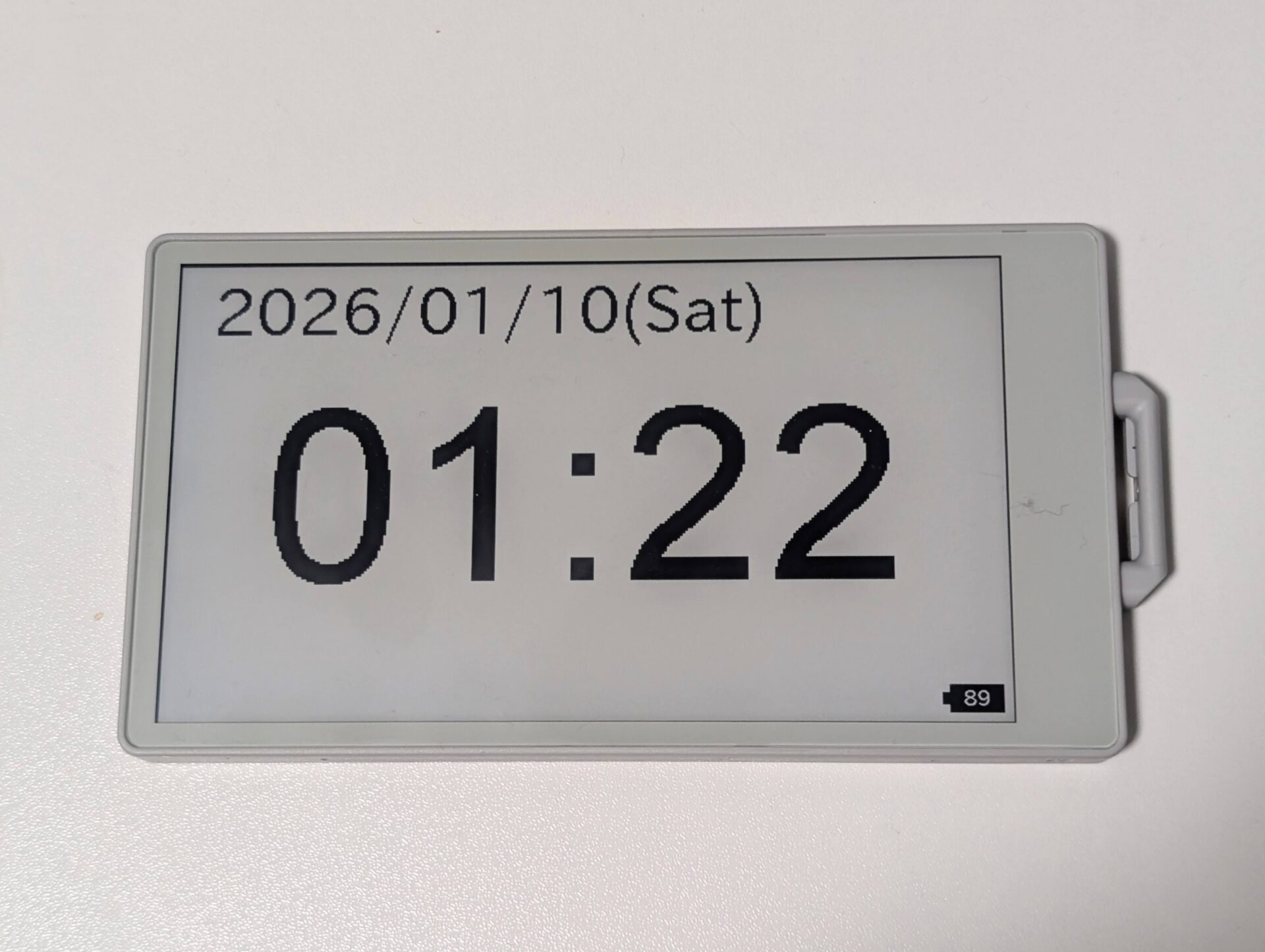
M5Paper S3 を使って、シンプルな電子ペーパー時計を作ってみました。
日時を表示して1分ごとに画面を更新するだけの単純な時計ですが、DeepSleep を使わない版とDeepSleep を使う版の2種類を作っています。
DeepSleep…マイコンのほとんどの機能を停止することで待機時間中の電力消費を抑える。起き上がるトリガーは時間か、外部入力などで行う。起きた時はSetupから開始され変数の値も大部分がリセットされるので、変数管理が複雑になる。
今回作った時計の仕様
表示内容
- 日付(年・月・日・曜日)
- 時刻(時・分)
- バッテリ残量(右下、100%表示)
画面更新:1分ごと
時刻取得:内蔵クロック。DeepSleep時はRTCも使用
時刻同期:Wi-Fi接続してNTPから取得、初回起動時と一時間ごと(00分)に同期する。
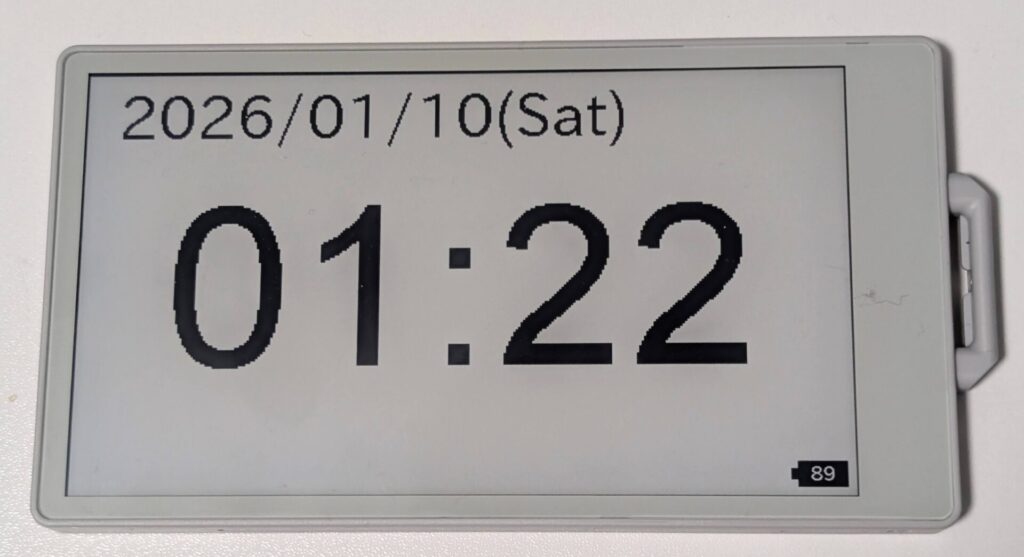
DeepSleepなし版(常時起動)
このプログラムは、M5Paper S3 を常時起動させたまま、1分ごとに画面を更新する時計です。
DeepSleep は使わず、loop() で画面更新まで待機する構成になっています。
プログラム全体の流れ
- 起動時に M5Paper S3 を初期化
- NTPで内蔵クロックを実時間に同期する
- 以下loop()処理
- 分が変わったら画面を更新
- 時が変わったタイミングで NTP 同期と画面のリフレッシュ
- 以後これを繰り返す
プログラム本体
※”YOUR WIFI SSID NAME” “YOUR WIFI PASSWORD” は自宅のWi-Fiに合わせて書き換える必要があります。
参考:https://docs.m5stack.com/ja/arduino/m5paper/rtc
|
1 2 3 4 5 6 7 8 9 10 11 12 13 14 15 16 17 18 19 20 21 22 23 24 25 26 27 28 29 30 31 32 33 34 35 36 37 38 39 40 41 42 43 44 45 46 47 48 49 50 51 52 53 54 55 56 57 58 59 60 61 62 63 64 65 66 67 68 69 70 71 72 73 74 75 76 77 78 79 80 81 82 83 84 85 86 87 88 89 90 91 92 93 94 95 96 97 98 99 100 101 102 103 104 105 106 107 108 109 110 111 112 113 114 115 116 117 118 119 120 121 122 123 124 125 126 127 128 129 130 131 132 133 134 135 136 137 138 139 140 141 142 143 144 145 |
#define WIFI_SSID "YOUR WIFI SSID NAME" //自宅のWi-Fiに合わせて書き換える #define WIFI_PASSWORD "YOUR WIFI PASSWORD" //自宅のWi-Fiに合わせて書き換える #include <M5Unified.h> #include <WiFi.h> #include <time.h> // Different versions of the framework have different SNTP header file names and availability. #if __has_include(<esp_sntp.h>) #include <esp_sntp.h> #define SNTP_ENABLED 1 #elif __has_include(<sntp.h>) #include <sntp.h> #define SNTP_ENABLED 1 #endif #ifndef SNTP_ENABLED #define SNTP_ENABLED 0 #endif #define NTP_TIMEZONE "UTC-9" // POSIX standard, in which "UTC+0" is UTC London, "UTC-8" is UTC+8 Beijing, "UTC+5" is UTC-5 New York #define NTP_SERVER1 "0.pool.ntp.org" #define NTP_SERVER2 "1.pool.ntp.org" #define NTP_SERVER3 "2.pool.ntp.org" static constexpr const char* const wd[7] = { "Sun", "Mon", "Tue", "Wed", "Thr", "Fri", "Sat" }; int last_hour = -1;//前回の時間 int last_min = -1;//前回の時間 //内蔵時計をNTP(UTC)に同期する void syncTimeWithNTP(){ Serial.print("WiFi: "); WiFi.begin(WIFI_SSID, WIFI_PASSWORD); while (WiFi.status() != WL_CONNECTED) { Serial.print("."); delay(500); } Serial.println("\nWiFi connected"); //ESP32の内蔵時計をNTPと同期 configTzTime(NTP_TIMEZONE, NTP_SERVER1, NTP_SERVER2, NTP_SERVER3); Serial.print("Time Zone:"); Serial.println(getenv("TZ")); Serial.print("NTP: "); #if SNTP_ENABLED Serial.println("SNTP_Enabled"); while (sntp_get_sync_status() != SNTP_SYNC_STATUS_COMPLETED) { Serial.print("."); delay(500); } #else Serial.println("SNTP_Unabled"); struct tm timeInfo; while (!getLocalTime(&timeInfo, 1000)) { Serial.print("."); delay(500); } #endif Serial.println("\nNTP connected"); time_t t = time(nullptr) + 1; // Advance one second //time(nullptr)=1970/1/1 while (t > time(nullptr)) ; // Synchronization in seconds(内蔵時計の秒未満のタイミングを0にそろえる) } void setup() { M5.begin(); Serial.begin(115200); M5.Display.setRotation(1); M5.Display.setEpdMode(epd_fast); // epd_quality, epd_text, epd_fast, epd_fastest setenv("TZ", "UTC-9", 1); tzset(); last_hour = -1; // 強制再同期 last_min = -1; // 強制再同期 } void loop() { time_t t = time(nullptr); struct tm tm_local; localtime_r(&t, &tm_local); int now_min = tm_local.tm_min; Serial.printf("now_min = %02d last_min = %02d\n",now_min,last_min); if(now_min != last_min){ last_min = now_min; //NTPを取得して内蔵時計を更新 int now_hour = tm_local.tm_hour; Serial.printf("now_hour = %02d last_hour = %02d\n",now_hour,last_hour); if(now_hour != last_hour){ last_hour = now_hour; Serial.println("Sync Time with NTP"); syncTimeWithNTP(); M5.Display.clear();//NTP更新時のみ画面リフレッシュ } //日付を表示 M5.Display.setCursor(40, 10); M5.Display.setFont(&fonts::lgfxJapanGothicP_40); M5.Display.setTextSize(2); M5.Display.printf("%04d/%02d/%02d(%s)", tm_local.tm_year + 1900, tm_local.tm_mon + 1, tm_local.tm_mday, wd[tm_local.tm_wday]); Serial.printf("%04d/%02d/%02d(%s)\n", tm_local.tm_year + 1900, tm_local.tm_mon + 1, tm_local.tm_mday, wd[tm_local.tm_wday]); //時刻を表示 M5.Display.setFont(&fonts::Font8);//数字のみ M5.Display.setTextSize(3); char buff[10]; // 表示用文字列格納バッファ sprintf(buff, "%02d:%02d", tm_local.tm_hour, tm_local.tm_min); M5.Lcd.drawCentreString(buff, 480, 160); Serial.printf(buff); //バッテリ残量を表示 int batt = M5.Power.getBatteryLevel(); // 0〜100 drawBatteryIcon(M5.Display.width()-70, M5.Display.height()-42, batt); } delay(1000); } //バッテリアイコン表示 void drawBatteryIcon(int x, int y, int level) { const int w = 60; const int h = 32; const int capW = 8; const int capH = 14; // 本体(黒) M5.Display.fillRect(x, y, w, h, BLACK); // 端子 M5.Display.fillRect(x-capW, y + (h-capH)/2, capW, capH, BLACK); // 数字(白) char buf[8]; snprintf(buf, sizeof(buf), "%d", level); M5.Display.setTextColor(WHITE, BLACK); M5.Display.setTextSize(1); M5.Display.setFont(&fonts::lgfxJapanGothicP_24); M5.Display.drawCentreString(buf, x + w/2, y+2); // 色を戻す M5.Display.setTextColor(BLACK, WHITE); } |
この方式のメリット・デメリット
〇動作が安定しやすい
〇状態管理がシンプル
〇画面更新がスムーズ
×消費電力が大きい
DeepSleepあり版(更新時以外は低消費電力)
このプログラムは、M5Paper S3 の画面を更新したらDeepSleepに入り、1分ごとにDeepSleepから復帰し、画面を更新する時計です。
DeepSleep からの復帰=毎回リセットに近い状態になるため、RTCに保存されている時間から内蔵時計の時間を復元しています。
プログラム全体の流れ
- 起床(リセット or DeepSleep復帰)
- 起床理由を判定
- RTC → 内蔵時計へ時刻コピー
- 必要なら NTP 同期(初回起動時と時が変わったタイミング)
- 画面描画
- 次の1分まで DeepSleep
loop() は一切使わず、setup() が1分に1回だけ実行される構成です。
プログラム本体
※”YOUR WIFI SSID NAME” “YOUR WIFI PASSWORD” は自宅のWi-Fiに合わせて書き換える必要があります。
|
1 2 3 4 5 6 7 8 9 10 11 12 13 14 15 16 17 18 19 20 21 22 23 24 25 26 27 28 29 30 31 32 33 34 35 36 37 38 39 40 41 42 43 44 45 46 47 48 49 50 51 52 53 54 55 56 57 58 59 60 61 62 63 64 65 66 67 68 69 70 71 72 73 74 75 76 77 78 79 80 81 82 83 84 85 86 87 88 89 90 91 92 93 94 95 96 97 98 99 100 101 102 103 104 105 106 107 108 109 110 111 112 113 114 115 116 117 118 119 120 121 122 123 124 125 126 127 128 129 130 131 132 133 134 135 136 137 138 139 140 141 142 143 144 145 146 147 148 149 150 151 152 153 154 155 156 157 158 159 160 161 162 163 164 165 166 167 168 169 170 171 172 173 174 175 176 177 178 179 180 181 182 183 184 185 186 187 188 189 190 191 192 193 194 195 196 197 198 199 200 201 202 203 204 205 206 207 208 209 210 211 212 213 214 215 216 217 218 219 220 221 222 223 224 225 226 227 228 229 230 231 232 233 |
#define WIFI_SSID "YOUR WIFI SSID NAME" //自宅のWi-Fiに合わせて書き換える #define WIFI_PASSWORD "YOUR WIFI PASSWORD" //自宅のWi-Fiに合わせて書き換える #include <M5Unified.h> #include <WiFi.h> #include <time.h> // Different versions of the framework have different SNTP header file names and availability. #if __has_include(<esp_sntp.h>) #include <esp_sntp.h> #define SNTP_ENABLED 1 #elif __has_include(<sntp.h>) #include <sntp.h> #define SNTP_ENABLED 1 #endif #ifndef SNTP_ENABLED #define SNTP_ENABLED 0 #endif #define NTP_TIMEZONE "UTC-9" // POSIX standard, in which "UTC+0" is UTC London, "UTC-8" is UTC+8 Beijing, "UTC+5" is UTC-5 New York #define NTP_SERVER1 "0.pool.ntp.org" #define NTP_SERVER2 "1.pool.ntp.org" #define NTP_SERVER3 "2.pool.ntp.org" static constexpr const char* const wd[7] = { "Sun", "Mon", "Tue", "Wed", "Thr", "Fri", "Sat" }; RTC_DATA_ATTR int last_hour = -1;//前回の時間(DeepSleepでも消えない) //時刻をRTCからUTCで抜き出す time_t timegm_like(struct tm *tm){ char *old_tz = getenv("TZ"); setenv("TZ", "UTC0", 1); tzset(); time_t t = mktime(tm); setenv("TZ", NTP_TIMEZONE, 1); tzset(); return t; } // ---------- RTCから内蔵時計へ時間を書き出し ---------- void syncRtcToSystemTime() { m5::rtc_time_t rtcTime; m5::rtc_date_t rtcDate; if (M5.Rtc.getTime(&rtcTime) && M5.Rtc.getDate(&rtcDate)) { struct tm tm_utc = {}; tm_utc.tm_year = rtcDate.year - 1900; tm_utc.tm_mon = rtcDate.month - 1; tm_utc.tm_mday = rtcDate.date; tm_utc.tm_hour = rtcTime.hours; tm_utc.tm_min = rtcTime.minutes; tm_utc.tm_sec = rtcTime.seconds; time_t epoch = timegm_like(&tm_utc); struct timeval tv; tv.tv_sec = epoch; tv.tv_usec = 0; settimeofday(&tv, nullptr); Serial.printf( "[RTC->SYS] %04d-%02d-%02d %02d:%02d:%02d UTC -> epoch=%ld\n", rtcDate.year, rtcDate.month, rtcDate.date, rtcTime.hours, rtcTime.minutes, rtcTime.seconds, (long)epoch ); } else { Serial.println("[RTC] read failed"); } } //RTCをNTP(UTC)に同期する void syncTimeWithNTP(){ Serial.print("WiFi: "); WiFi.begin(WIFI_SSID, WIFI_PASSWORD); while (WiFi.status() != WL_CONNECTED) { Serial.print("."); delay(500); } Serial.println("\nWiFi connected"); //ESP32の内蔵時計をNTPと同期 configTzTime(NTP_TIMEZONE, NTP_SERVER1, NTP_SERVER2, NTP_SERVER3); Serial.print("Time Zone:"); Serial.println(getenv("TZ")); Serial.print("NTP: "); #if SNTP_ENABLED Serial.println("SNTP_Enabled"); while (sntp_get_sync_status() != SNTP_SYNC_STATUS_COMPLETED) { Serial.print("."); delay(500); } #else Serial.println("SNTP_Unabled"); struct tm timeInfo; while (!getLocalTime(&timeInfo, 1000)) { Serial.print("."); delay(500); } #endif Serial.println("\nNTP connected"); time_t t = time(nullptr) + 1; // Advance one second //time(nullptr)=1970/1/1 while (t > time(nullptr)) ; // Synchronization in seconds(内蔵時計の秒未満のタイミングを0にそろえる) M5.Rtc.setDateTime(gmtime(&t));//RTCにNTP同期の時間(UTC)を書き込み } //次の分更新までDeepSleep void sleepUntilNextMinute() { time_t now = time(nullptr); struct tm tm_utc; gmtime_r(&now, &tm_utc); // 秒を 0 にして 1分進める tm_utc.tm_sec = 0; tm_utc.tm_min += 1; time_t next_minute = timegm_like(&tm_utc); uint32_t diff = next_minute - now; Serial.printf( "[SLEEP] now=%ld next=%ld diff=%u sec\n", now, next_minute, diff ); // 保険:0秒は避ける if (diff == 0) diff = 1; uint64_t sleep_us = (uint64_t)diff * 1000000ULL; Serial.printf( "[SLEEP] DeepSleep for %u sec (%llu us)\n", diff, sleep_us ); esp_sleep_enable_timer_wakeup(sleep_us); esp_deep_sleep_start(); } void setup() { M5.begin(); Serial.begin(115200); M5.Display.setRotation(1); M5.Display.setEpdMode(epd_fast); // epd_quality, epd_text, epd_fast, epd_fastest setenv("TZ", "UTC-9", 1); tzset(); Serial.print("[Wakeup cause] "); esp_sleep_wakeup_cause_t cause = esp_sleep_get_wakeup_cause(); if(cause == ESP_SLEEP_WAKEUP_TIMER){ Serial.println("DeepSleep (TIMER)"); syncRtcToSystemTime(); } else{ Serial.println("Reset"); last_hour = -1; // 強制再同期 } //NTPを取得してRTC・内蔵時計を更新 time_t t = time(nullptr); struct tm tm_local; localtime_r(&t, &tm_local); int now_hour = tm_local.tm_hour; Serial.printf("now_hour = %02d last_hour = %02d\n",now_hour,last_hour); if(now_hour != last_hour){ last_hour = now_hour; Serial.println("Sync Time with NTP"); syncTimeWithNTP(); M5.Display.clear();//NTP更新時のみ画面リフレッシュ } //日付を表示 M5.Display.setCursor(40, 10); M5.Display.setFont(&fonts::lgfxJapanGothicP_40); M5.Display.setTextSize(2); M5.Display.printf("%04d/%02d/%02d(%s)", tm_local.tm_year + 1900, tm_local.tm_mon + 1, tm_local.tm_mday, wd[tm_local.tm_wday]); Serial.printf("%04d/%02d/%02d(%s)\n", tm_local.tm_year + 1900, tm_local.tm_mon + 1, tm_local.tm_mday, wd[tm_local.tm_wday]); //時刻を表示 M5.Display.setFont(&fonts::Font8);//数字のみ M5.Display.setTextSize(3); char buff[10]; // 表示用文字列格納バッファ sprintf(buff, "%02d:%02d", tm_local.tm_hour, tm_local.tm_min); M5.Lcd.drawCentreString(buff, 480, 160); Serial.printf(buff); //バッテリ残量を表示 int batt = M5.Power.getBatteryLevel(); // 0〜100 drawBatteryIcon(M5.Display.width()-70, M5.Display.height()-42, batt); delay(1000); //次の分更新までDeepSleep sleepUntilNextMinute(); } void loop() { } //バッテリアイコン表示 void drawBatteryIcon(int x, int y, int level) { const int w = 60; const int h = 32; const int capW = 8; const int capH = 14; // 本体(黒) M5.Display.fillRect(x, y, w, h, BLACK); // 端子 M5.Display.fillRect(x-capW, y + (h-capH)/2, capW, capH, BLACK); // 数字(白) char buf[8]; snprintf(buf, sizeof(buf), "%d", level); M5.Display.setTextColor(WHITE, BLACK); M5.Display.setTextSize(1); M5.Display.setFont(&fonts::lgfxJapanGothicP_24); M5.Display.drawCentreString(buf, x + w/2, y+2); // 色を戻す M5.Display.setTextColor(BLACK, WHITE); } |
この方式のメリット・デメリット
〇消費電力が少ない(電子ペーパーなのでDeepSleep時も表示が消えない)
〇電池での長時間駆動ができるので時計の運用として実用的
×画面更新時に画面が点滅する(電子ペーパーの特性)
×実装が複雑(DeepSleep復帰時の変数の保管・復元が必要)
×時間管理が複雑(RTCと内蔵時計の同期、タイムゾーンの扱いが必要)
ちなみに約24時間経過でバッテリ残量が100%→89%になったので、1週間超は充電なしで持ちそうです。NTPの同期間隔を長くすれば(例えば1日に一度とか)、もっと消費電力を抑えられそうです。
Wi-Fiがつながらなかった時の対策版
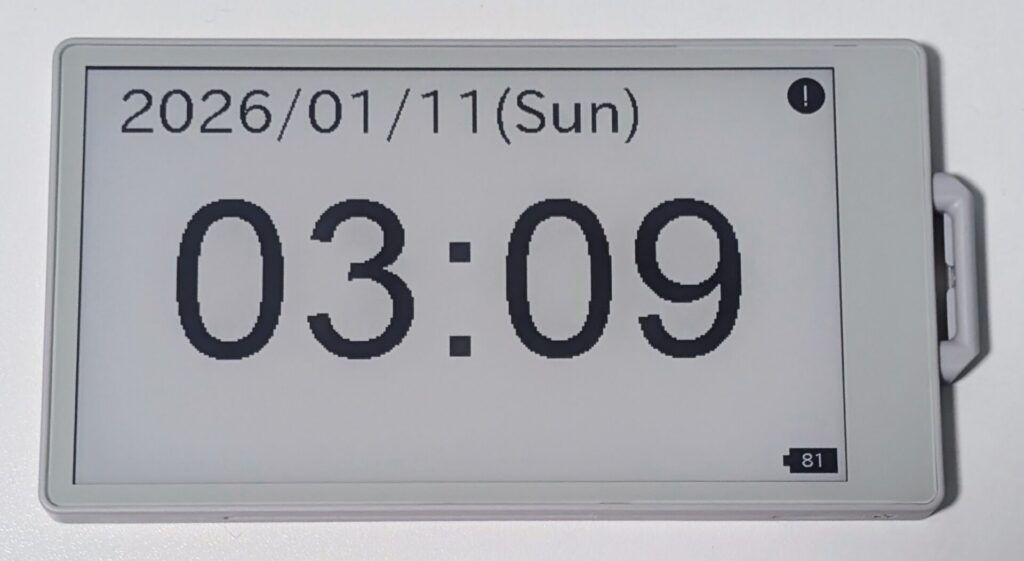
作った後で気づいたのですが、Wi-Fiがつながらなかった場合、つながるまで延々と待機状態になってしまう仕様になっていました。そのため、Wi-Fiがつながらなかった場合、またはNTPの同期に失敗した場合にはRTCの値をそのまま使い続ける仕様に改良します。また、つながらなかった場合は「!」のアイコンを右上に表示して分かるようにします。
|
1 2 3 4 5 6 7 8 9 10 11 12 13 14 15 16 17 18 19 20 21 22 23 24 25 26 27 28 29 30 31 32 33 34 35 36 37 38 39 40 41 42 43 44 45 46 47 48 49 50 51 52 53 54 55 56 57 58 59 60 61 62 63 64 65 66 67 68 69 70 71 72 73 74 75 76 77 78 79 80 81 82 83 84 85 86 87 88 89 90 91 92 93 94 95 96 97 98 99 100 101 102 103 104 105 106 107 108 109 110 111 112 113 114 115 116 117 118 119 120 121 122 123 124 125 126 127 128 129 130 131 132 133 134 135 136 137 138 139 140 141 142 143 144 145 146 147 148 149 150 151 152 153 154 155 156 157 158 159 160 161 162 163 164 165 166 167 168 169 170 171 172 173 174 175 176 177 178 179 180 181 182 183 184 185 186 187 188 189 190 191 192 193 194 195 196 197 198 199 200 201 202 203 204 205 206 207 208 209 210 211 212 213 214 215 216 217 218 219 220 221 222 223 224 225 226 227 228 229 230 231 232 233 234 235 236 237 238 239 240 241 242 243 244 245 246 247 248 249 250 251 252 253 254 255 256 257 258 259 260 261 262 263 264 265 266 267 268 269 270 271 272 273 274 275 276 277 278 279 280 281 282 283 284 285 286 287 288 289 290 291 292 293 294 295 296 297 298 299 300 301 302 303 304 305 |
//引用:https://docs.m5stack.com/ja/arduino/m5paper/rtc //表示の作りこみとDeepSleepの実装 //WiFi接続に失敗しても止まらないようにする // ===== WiFi設定 ===== #define WIFI_SSID "YOUR WIFI SSID NAME" //自宅のWi-Fiに合わせて書き換える #define WIFI_PASSWORD "YOUR WIFI PASSWORD" //自宅のWi-Fiに合わせて書き換える #include <M5Unified.h> #include <WiFi.h> #include <time.h> // Different versions of the framework have different SNTP header file names and availability. #if __has_include(<esp_sntp.h>) #include <esp_sntp.h> #define SNTP_ENABLED 1 #elif __has_include(<sntp.h>) #include <sntp.h> #define SNTP_ENABLED 1 #endif #ifndef SNTP_ENABLED #define SNTP_ENABLED 0 #endif #define NTP_TIMEZONE "UTC-9" // POSIX standard, in which "UTC+0" is UTC London, "UTC-8" is UTC+8 Beijing, "UTC+5" is UTC-5 New York #define NTP_SERVER1 "0.pool.ntp.org" #define NTP_SERVER2 "1.pool.ntp.org" #define NTP_SERVER3 "2.pool.ntp.org" #define NTP_ICON_X 900 #define NTP_ICON_Y 10 #define NTP_ICON_SIZE 50 static constexpr const char* const wd[7] = { "Sun", "Mon", "Tue", "Wed", "Thr", "Fri", "Sat" }; RTC_DATA_ATTR int last_hour = -1;//前回の時間(DeepSleepでも消えない) RTC_DATA_ATTR bool ntpSynced = false; RTC_DATA_ATTR bool wifiConnected = false; //時刻をRTCからUTCで抜き出す time_t timegm_like(struct tm *tm){ char *old_tz = getenv("TZ"); setenv("TZ", "UTC0", 1); tzset(); time_t t = mktime(tm); setenv("TZ", NTP_TIMEZONE, 1); tzset(); return t; } // ---------- RTCから内蔵時計へ時間を書き出し ---------- void syncRtcToSystemTime() { m5::rtc_time_t rtcTime; m5::rtc_date_t rtcDate; if (M5.Rtc.getTime(&rtcTime) && M5.Rtc.getDate(&rtcDate)) { struct tm tm_utc = {}; tm_utc.tm_year = rtcDate.year - 1900; tm_utc.tm_mon = rtcDate.month - 1; tm_utc.tm_mday = rtcDate.date; tm_utc.tm_hour = rtcTime.hours; tm_utc.tm_min = rtcTime.minutes; tm_utc.tm_sec = rtcTime.seconds; time_t epoch = timegm_like(&tm_utc); struct timeval tv; tv.tv_sec = epoch; tv.tv_usec = 0; settimeofday(&tv, nullptr); Serial.printf( "[RTC->SYS] %04d-%02d-%02d %02d:%02d:%02d UTC -> epoch=%ld\n", rtcDate.year, rtcDate.month, rtcDate.date, rtcTime.hours, rtcTime.minutes, rtcTime.seconds, (long)epoch ); } else { Serial.println("[RTC] read failed"); } } //RTCをNTP(UTC)に同期する bool syncTimeWithNTP(){ Serial.println("\nWiFi connected"); //ESP32の内蔵時計をNTPと同期 configTzTime(NTP_TIMEZONE, NTP_SERVER1, NTP_SERVER2, NTP_SERVER3); Serial.print("Time Zone:"); Serial.println(getenv("TZ")); Serial.print("NTP: "); uint32_t start = millis(); #if SNTP_ENABLED Serial.println("SNTP_Enabled"); while (sntp_get_sync_status() != SNTP_SYNC_STATUS_COMPLETED) { if (millis() - start > 10000) { Serial.println("[NTP] sync timeout"); return false; } Serial.print("."); delay(500); } #else Serial.println("SNTP_Unabled"); struct tm timeInfo; while (!getLocalTime(&timeInfo, 1000)) { if (millis() - start > 10000) { Serial.println("[NTP] sync timeout"); return false; } Serial.print("."); delay(500); } #endif Serial.println("\nNTP connected"); WiFi.disconnect(true); WiFi.mode(WIFI_OFF); Serial.println("[WiFi] OFF"); time_t t = time(nullptr) + 1; // Advance one second //time(nullptr)=1970/1/1 while (t > time(nullptr)) ; // Synchronization in seconds(内蔵時計の秒未満のタイミングを0にそろえる) M5.Rtc.setDateTime(gmtime(&t));//RTCにNTP同期の時間(UTC)を書き込み return true; } //次の分更新までDeepSleep void sleepUntilNextMinute() { time_t now = time(nullptr); struct tm tm_utc; gmtime_r(&now, &tm_utc); // 秒を 0 にして 1分進める tm_utc.tm_sec = 0; tm_utc.tm_min += 1; time_t next_minute = timegm_like(&tm_utc); uint32_t diff = next_minute - now; Serial.printf( "[SLEEP] now=%ld next=%ld diff=%u sec\n", now, next_minute, diff ); // 保険:0秒は避ける if (diff == 0) diff = 1; uint64_t sleep_us = (uint64_t)diff * 1000000ULL; Serial.printf( "[SLEEP] DeepSleep for %u sec (%llu us)\n", diff, sleep_us ); esp_sleep_enable_timer_wakeup(sleep_us); esp_deep_sleep_start(); } void setup() { M5.begin(); Serial.begin(115200); M5.Display.setRotation(1); M5.Display.setEpdMode(epd_fast); // epd_quality, epd_text, epd_fast, epd_fastest setenv("TZ", "UTC-9", 1); tzset(); //RTCの値を内蔵時計と同期 syncRtcToSystemTime(); Serial.print("[Wakeup cause] "); esp_sleep_wakeup_cause_t cause = esp_sleep_get_wakeup_cause(); if(cause == ESP_SLEEP_WAKEUP_TIMER){ Serial.println("DeepSleep (TIMER)"); } else{ Serial.println("Reset"); last_hour = -1; // 強制再同期 } //NTPを取得してRTC・内蔵時計を更新(一時間ごとorリセット時) time_t t = time(nullptr); struct tm tm_local; localtime_r(&t, &tm_local); int now_hour = tm_local.tm_hour; Serial.printf("now_hour = %02d last_hour = %02d\n",now_hour,last_hour); if(now_hour != last_hour){ last_hour = now_hour; Serial.println("Sync Time with NTP"); Serial.print("WiFi: "); WiFi.begin(WIFI_SSID, WIFI_PASSWORD); if (WiFi.waitForConnectResult() == WL_CONNECTED) { wifiConnected = true; ntpSynced = syncTimeWithNTP(); } else{ Serial.println("WiFi Connect Failed"); wifiConnected = false; } M5.Display.clear(); } Serial.println("Clock Display Start"); //日付を表示 M5.Display.setCursor(40, 10); M5.Display.setFont(&fonts::lgfxJapanGothicP_40); M5.Display.setTextSize(2); M5.Display.printf("%04d/%02d/%02d(%s)", tm_local.tm_year + 1900, tm_local.tm_mon + 1, tm_local.tm_mday, wd[tm_local.tm_wday]); Serial.printf("%04d/%02d/%02d(%s)", tm_local.tm_year + 1900, tm_local.tm_mon + 1, tm_local.tm_mday, wd[tm_local.tm_wday]); //時刻を表示 M5.Display.setFont(&fonts::Font8);//数字のみ M5.Display.setTextSize(3); char buff[10]; // 表示用文字列格納バッファ sprintf(buff, "%02d:%02d\n", tm_local.tm_hour, tm_local.tm_min); M5.Lcd.drawCentreString(buff, 480, 160); Serial.printf(buff); //バッテリ残量を表示 int batt = M5.Power.getBatteryLevel(); // 0〜100 drawBatteryIcon(M5.Display.width()-70, M5.Display.height()-42, batt); Serial.printf("Battery:%d\n", batt); //NTP同期失敗アイコンを表示 if (!ntpSynced && !wifiConnected) { Serial.println("NTP Sync Failed"); drawNtpErrorIcon(); } Serial.println("Clock Display End"); delay(1000);//描画待ち //次の分更新までDeepSleep sleepUntilNextMinute(); } void loop() { } //バッテリアイコン表示 void drawBatteryIcon(int x, int y, int level) { const int w = 60; const int h = 32; const int capW = 8; const int capH = 14; // 本体(黒) M5.Display.fillRect(x, y, w, h, BLACK); // 端子 M5.Display.fillRect(x-capW, y + (h-capH)/2, capW, capH, BLACK); // 数字(白) char buf[8]; snprintf(buf, sizeof(buf), "%d", level); M5.Display.setTextColor(WHITE, BLACK); M5.Display.setTextSize(1); M5.Display.setFont(&fonts::lgfxJapanGothicP_24); M5.Display.drawCentreString(buf, x + w/2, y+2); // 色を戻す M5.Display.setTextColor(BLACK, WHITE); } //NTP同期失敗時のアイコン表示 void drawNtpErrorIcon() { int cx = NTP_ICON_X + NTP_ICON_SIZE / 2; int cy = NTP_ICON_Y + NTP_ICON_SIZE / 2; int r = NTP_ICON_SIZE / 2 - 1; // 念のため背景クリア M5.Display.fillRect( NTP_ICON_X, NTP_ICON_Y, NTP_ICON_SIZE, NTP_ICON_SIZE, WHITE ); // 黒い円(●) M5.Display.fillCircle(cx, cy, r, BLACK); // 白い「!」 M5.Display.setTextColor(WHITE, BLACK); M5.Display.setTextDatum(middle_center); M5.Display.setFont(&fonts::Font4); M5.Display.setTextSize(1.5); M5.Display.drawString("!", cx, cy + 5); // 後始末(他描画への影響防止) M5.Display.setTextColor(BLACK, WHITE); M5.Display.setTextDatum(top_left); Serial.println("[EPD] NTP error icon drawn"); } |


コメント